On this page
Short answer
Both on Apple devices and happy with simple lists: start with Apple Reminders, it’s already on your phones. One of you on Android: Todoist or TickTick. You plan around a shared calendar: Cupla for two, Cozi for a whole family. You run your own life in GTD and want your partner to see only their part: that’s the gap DuetFlow was built for.
How we compared
We make DuetFlow, so treat this as a comparison from a competitor and check the sources we link. Every statement about another app comes from that vendor’s own pricing page, help center, or FAQ, read in November 2026. Where a vendor doesn’t say something clearly, we leave it out rather than guess.
We asked three questions. First, what does your partner have to do to take part? Second, can the app say who a task belongs to? Third, what does it cost for both of you to share?
At a glance
| App | Best for | Who does what | Sharing cost | Platforms |
|---|---|---|---|---|
| Apple Reminders | Simple shared lists on Apple devices | Assign a reminder to a person in a shared list | Built into Apple devices | Apple only |
| Todoist | Mixed Apple and Android households | One assignee per task | Free plan includes shared projects | Apple, Android, Windows, Linux |
| TickTick | A generous free start | Assign tasks to specific people | Free plan; Premium US$49.99 a year for larger sharing | Apple, Android, Windows, Linux, web |
| Any.do | A family space with groceries | Assign to one or more members | Family plan, $8.33 a month billed annually | Apple, Android, Windows, web |
| Cupla | Couples who live by a calendar | One partner, the other, or both | Free plan; one Premium subscription per couple | iOS, Android, web (beta) |
| Cozi | Families with kids | Assign chores or tasks to people | Free with ads; Gold $39 a year for everyone | iOS, Android, web |
| DuetFlow | A GTD organizer and a partner who wants a short list | One named person, whoever is free, or everyone | Planned 29.99 € once with Family Sharing | Mac, iPhone, iPad |
Apple Reminders: the easiest yes
Your partner already has it. Apple’s support guide describes sharing a list and assigning reminders to people “to split up tasks or grocery items.” Invitees need iOS 13 or later, so this only works if you are all on Apple devices. One detail matters for couples: notifications you set on a reminder aren’t shared, so your alert won’t remind your partner. For a grocery list and a handful of chores, nothing is easier to get your partner into.
Todoist: the safe choice across platforms
Todoist’s free plan includes five personal projects, up to five people per project, and assigned tasks. Pro costs 5 € a month, billed yearly. Its help center is clear about the trade-off: “You can only assign a single person to a task.” Tasks that either of you could do, or that both of you need to do, become unassigned tasks or duplicates. If one of you uses Android or Windows, Todoist is still the most dependable pick here.
TickTick: the most you get for free
TickTick’s plan comparison lists a member count of two on the free plan, enough for a couple, with up to nine lists of 99 tasks each. Premium costs US$49.99 a year and raises the member count to 29. Its help center says any member of a shared list can assign tasks to specific people, and that only the list owner needs Premium. It runs on Apple devices, Android, Windows, Linux, and the web. It is a full productivity app, which tends to suit the organizer more than a partner who wants one short list.
Any.do: a family space, if you pay for it
On Any.do, sharing and assigning belong to the Family plan: $8.33 a month billed annually for up to four members, with a shared family space, a shared grocery list, and up to four shared projects. Its help center says the free and Premium plans include your personal space only, and that assigning is not available there. Each member keeps a private personal space next to the family one. Any.do also sends reminders through WhatsApp and runs on iPhone, Android, Mac, Windows, and the web. Our Any.do comparison goes into more detail.
Cupla: built for exactly two
Cupla is a shared calendar first, and its facts page describes shared task lists with assignment to “one partner, the other, or both.” Every Cupla account links two partners. It runs on iOS and Android, with a web version in beta since May 2026. The free plan shows your partner’s events and to-dos only in a limited window around today, and Premium is one subscription per couple. If your shared life runs on the calendar, Cupla is a strong fit.
Cozi: the family organizer
Cozi’s FAQ describes one family account for up to 12 people, shared to-do lists where you assign chores or tasks to specific people, and a calendar at the center. The free version is supported by ads; Cozi Gold costs $39 a year, and one subscription covers everyone in the account. In Chores lists, tasks can repeat daily or weekly. Parents juggling kids’ schedules are who it’s made for.
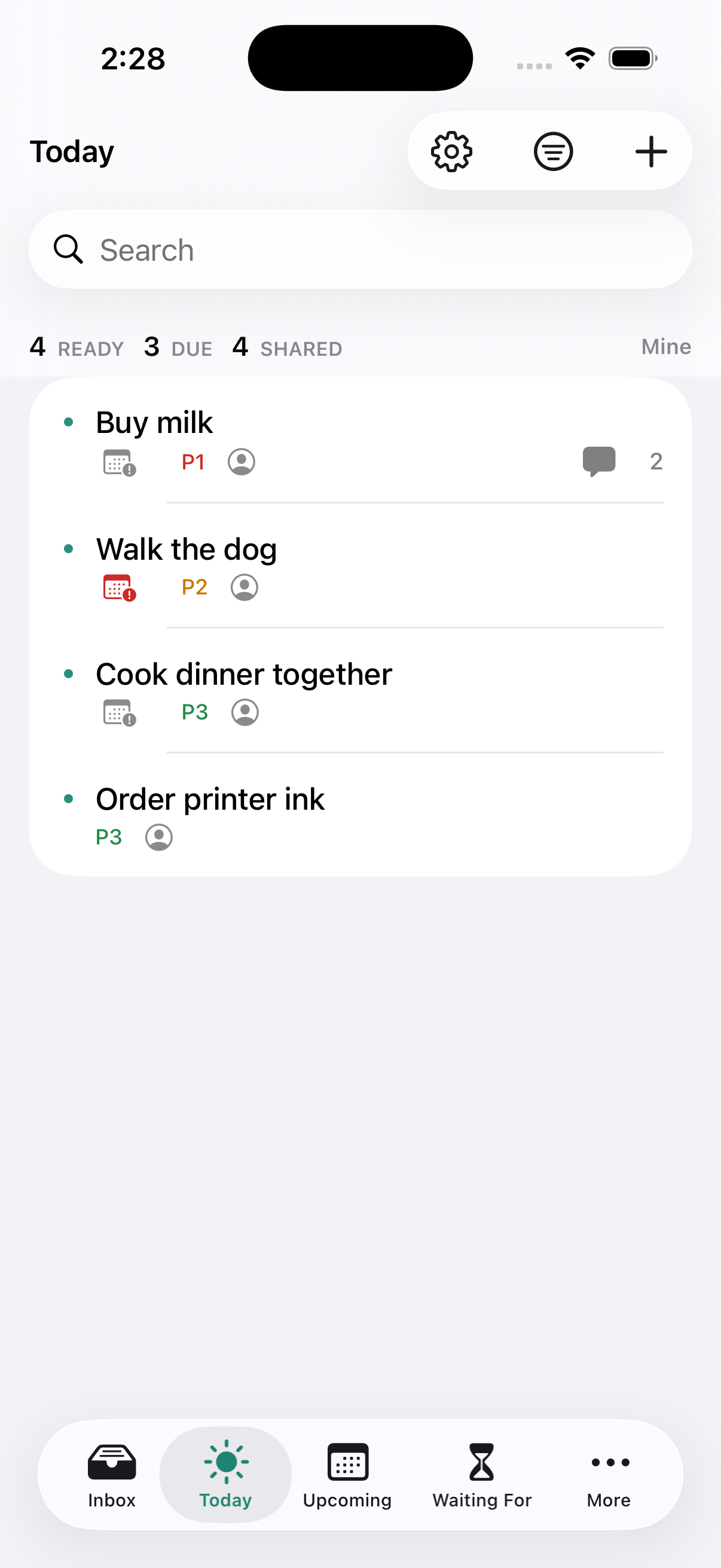
Where DuetFlow fits
DuetFlow starts from a different assumption: the two of you don’t want the same app. You get a full GTD system with Inbox, Upcoming, projects whose steps unlock in order, Waiting For, and Someday. Your partner opens Today and sees what is theirs.
Each task says who is responsible: one person, or several with Any can complete (whoever finishes first closes it) or All must complete (everyone has their own checkbox). Private tasks stay yours. It syncs through iCloud with no DuetFlow account. It runs only on Mac, iPhone, and iPad, and it isn’t public yet. The planned price is 29.99 € once, shared through Family Sharing.
How to choose
Start with your partner, not with yourself. If they use Android, choose Todoist or TickTick. If they would rather look at a calendar than a list, choose Cupla, or Cozi when kids are part of the plan. If you are both on Apple devices and simple lists are enough, Apple Reminders costs nothing and needs no convincing. If you want a real planning system for yourself and a short, calm list for your partner, DuetFlow is made for that.
A quick test
Before you commit, give your partner your phone with the app open and ask them to add “buy milk” and mark one task as done. If that takes more than ten seconds or a question, keep looking.
DuetFlow early access
A real system for you. A short list for your partner.
DuetFlow is not public yet. Join for private-beta plus launch updates, or choose only the launch announcement. The planned launch price is 29.99 € once with Family Sharing.
Email me early accessDouble opt-in. No analytics or advertising cookies. No behavioural tracking. Research questions are optional.
Prices and plans as published by each vendor in November 2026; they can change. All product names are trademarks of their respective owners. DuetFlow is an independent product and is not affiliated with or endorsed by any of the companies mentioned.