On this page
Short answer
On Any.do, sharing tasks with your partner and assigning them needs the Family plan, $8.33 a month billed annually for up to four members. If either of you uses Android or Windows, or you want reminders in WhatsApp, stay with Any.do. If you are both on Apple devices, you want a full GTD system for yourself and a short list for your partner, and you would rather pay once, DuetFlow fits better.
What Any.do does well
Any.do runs on iPhone, Android, Mac, Windows, and the web, so a mixed household is no problem. You can add tasks and get reminders in WhatsApp, which lowers the bar for a partner who lives in chat. It has an official MCP connector for AI assistants. On the Family plan, you get a shared family space with a shared grocery list and up to four shared projects, and each person still keeps a private personal space. Tasks can go to one or more members, and even single checklist items can be assigned.
What sharing takes on Any.do
The first hurdle is the plan. Any.do’s help center says the free and Premium plans include your personal space only, and assigning tasks is not available there. To share with your partner, you need Family, which is a subscription for the household.
The second is visibility. Any.do’s help center says its collective views show only the tasks assigned to you, and that shared tasks not assigned to you won’t appear there. That keeps your partner’s view clean. It also means a task that either of you could do has to be assigned to someone; otherwise it won’t show up in either of your collective views.
The third is depth. The family space holds up to four shared projects. That’s plenty for groceries and chores. If you think in GTD, with many projects, next actions, and things you are waiting on, the household side of your system has to fit inside that space.
Side by side
| Any.do | DuetFlow | |
|---|---|---|
| Share with your partner | Family plan; free and Premium are personal only | Yes, shared through iCloud |
| Assign a task | One or more members | One named person, whoever is free, or everyone |
| Shared projects | Up to 4 in the family space | As many as you need |
| Private tasks | Personal space next to the family space | A separate private store in your own iCloud, never on a DuetFlow server |
| Planning depth | Lists, projects, calendar, daily planner | GTD: Inbox, sequential projects, Waiting For, Someday |
| AI assistant | Official MCP connector | Optional local MCP connection on the Mac, no relay |
| Platforms | iPhone, Android, Mac, Windows, web | Mac, iPhone, iPad |
| Price for sharing | $8.33 a month billed annually, up to 4 members | Planned 29.99 € once, shared through Family Sharing |
How DuetFlow handles it
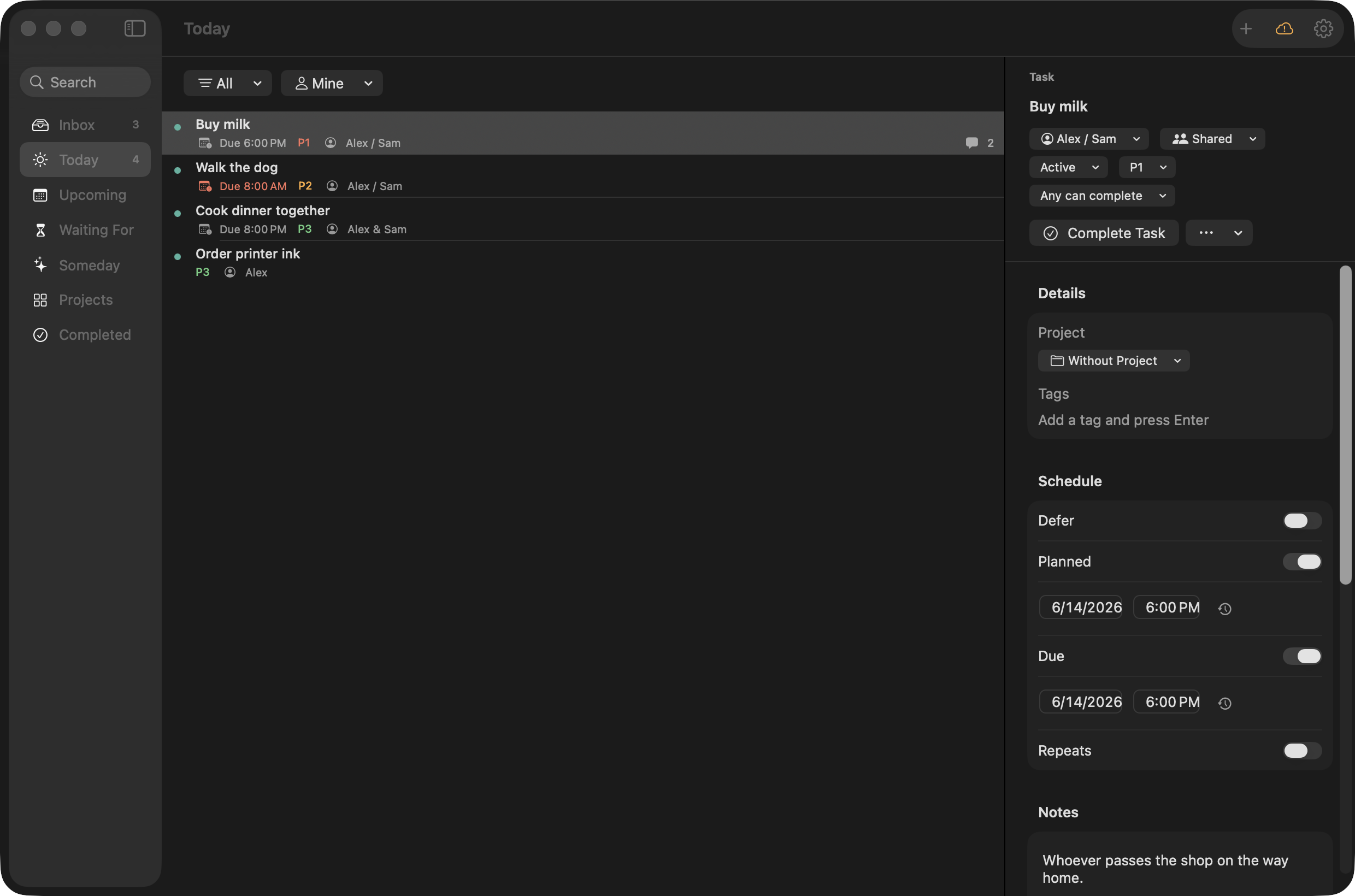
In DuetFlow, each task says whose it is, including the ones either of you could do. A task can go to one named person. Or you make both of you responsible and pick the completion: with Any can complete, the first to finish closes it for both; with All must complete, each person gets their own checkbox on one task. Private tasks stay yours.
You keep the whole system: Inbox, Upcoming, projects whose steps unlock in order, Waiting For, and Someday. Your partner opens Today and sees what is theirs, nothing more. Everything syncs through Apple’s own sharing and your private tasks stay in your own iCloud, so there is no DuetFlow account to create and no DuetFlow server holding your household.
Which one to choose
Choose Any.do if anyone in your household uses Android or Windows, if WhatsApp reminders are what will get your partner to take part, or if a shared grocery list and a few shared projects cover your home. Choose DuetFlow if you are both on Apple devices, you want real GTD for yourself without handing your partner a complicated app, and you prefer a one-time price to a household subscription.
A quick check
Open your family space and look for tasks nobody is assigned to. If there are few, Any.do is doing its job. If “either of us” tasks keep slipping through, that is the gap DuetFlow was designed to close.
DuetFlow early access
A real system for you. A short list for your partner.
DuetFlow is not public yet. Join for private-beta plus launch updates, or choose only the launch announcement. The planned launch price is 29.99 € once with Family Sharing.
Email me early accessDouble opt-in. No analytics or advertising cookies. No behavioural tracking. Research questions are optional.
Prices and plans as published by Any.do in November 2026; they can change. Any.do is a trademark of its owner. Apple is a trademark of Apple Inc. DuetFlow is an independent product and is not affiliated with or endorsed by Any.do or Apple.